
Get in touch
Email support@dayreplay.app. We aim to reply within 1–2 business days; allow longer on weekends, holidays, or during launch periods.
Before emailing — quick self-help
- Windows SmartScreen warning on install — only affects the direct
.msidownload from a newly-signed identity; installing from the Microsoft Store avoids it. The Publisher line in the dialog reads Zaahr Inc. See the FAQ for the click-through and verification options. - macOS timeline only shows process names — DayReplay needs Accessibility permission. Open System Settings → Privacy & Security → Accessibility and toggle DayReplay on, then quit and relaunch the app. See the FAQ.
- Timeline gaps — sessions shorter than 10 seconds are filtered as noise, and a 90-second silence starts a new session. Both intentional. See timeline behavior.
Fastest way to get help
- Include your DayReplay app version (visible in the app status bar, or in the Updates settings dialog under “Current version”).
- Include your OS — Windows version (e.g. Windows 11 23H2) or macOS version (e.g. macOS 14.5).
- Describe the expected behavior and the actual behavior.
- Attach the Diagnostics export (Diagnostics panel → Copy log) — available on every tier.
- If relevant, include any antivirus or SmartScreen message text verbatim.
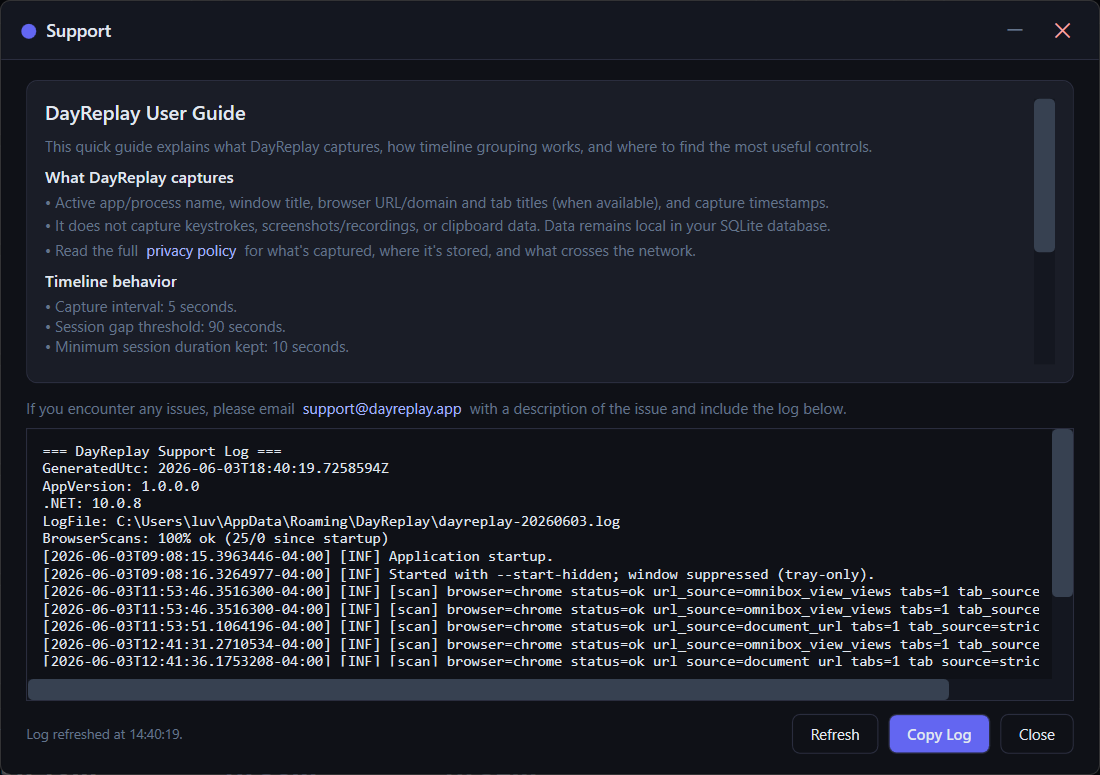
Common support topics
- Installation and first-run questions on Windows or macOS.
- Granting macOS Accessibility permission, or recovering after denying it.
- Timeline gaps or unexpected categorisation.
- Activating, transferring, or cancelling Pro (billing, refunds — see Terms).
- Customising category rules (domain/path + process, including per-org and per-repo targeting) — see the rules guide.
- Exporting captured data via CSV (Pro) or deleting it locally — see Privacy.
Security & vulnerability disclosure
Security researchers: if you discover a vulnerability in DayReplay or this site, please email support@dayreplay.app with [SECURITY] in the subject line. We acknowledge receipt within two business days. See the responsible disclosure policy on the Legal page for our coordinated-disclosure commitments.
Documentation shortcuts
- How DayReplay works
- Customize category rules
- FAQ — install, SmartScreen, Accessibility, billing
- Privacy policy
- Security & privacy details
- Terms of Service
- Legal & Trademark notices