Local-first storage Native Windows & macOS builds Zero telemetry One license, up to five devices
A real timeline, not a timer log
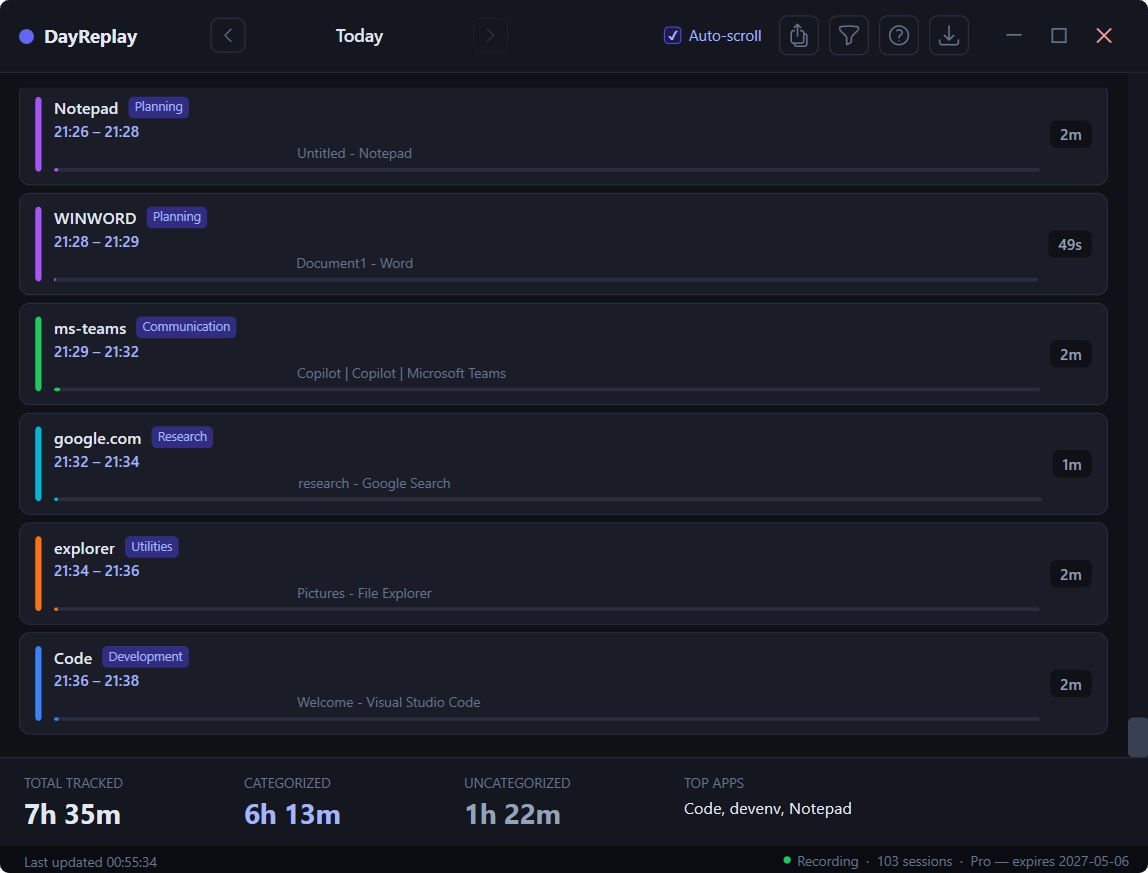
See your day reconstructed
One row per session with the application you were using — plus the current URL and other open tab titles when you're in a supported browser. End-of-day review takes minutes instead of the manual reconstruction that typically drags into Friday afternoons.
Why DayReplay
Built for fragmented workdays
Tunable categorization
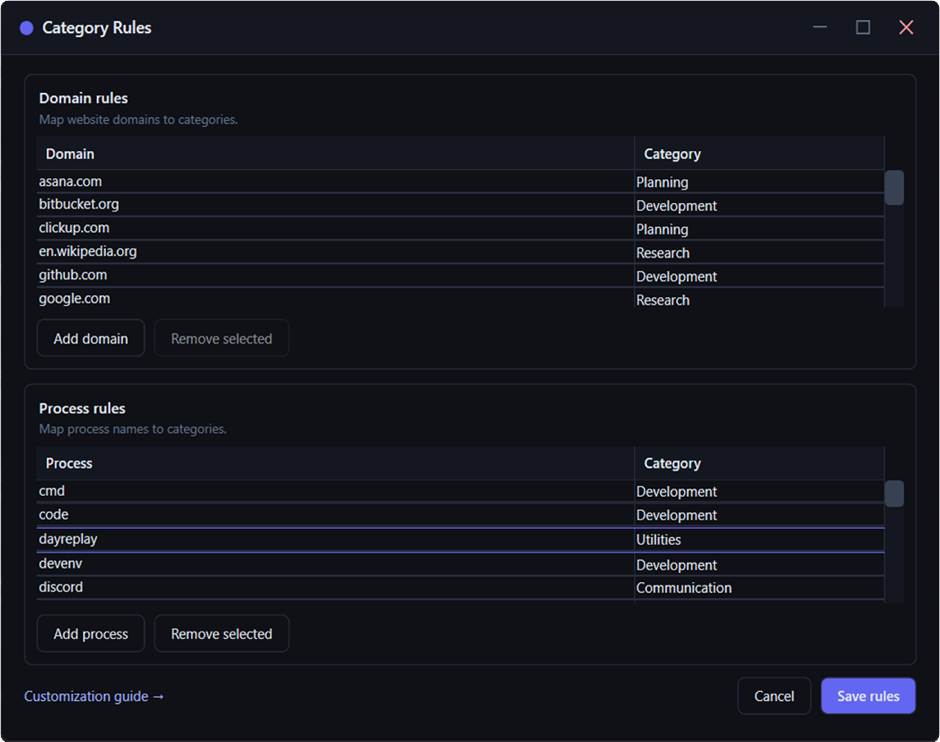
Sensible defaults out of the box — browsers, IDEs, mail clients, chat apps all detected. Pro lets you refine that with two kinds of rules:
Domain rules for browser activity — linear.app → Planning, github.com → Development
Process rules for desktop apps — OUTLOOK.EXE → Communication, code.exe → Development
Your own categories & colours — add, rename, and recolour so the timeline reads in your palette
Every session lands in the right bucket, so the timeline reads as project work instead of generic app names.
DayReplay samples the foreground app, window title, and active browser tab every five seconds. There are no timers to start, stop, or remember — context-switching no longer erodes your records.
Browser tab context
Beyond the application name, DayReplay records the active tab's URL and the titles of other open tabs in the focused window. Sessions are grouped by domain so the timeline reads as project work rather than “Chrome, 4 hours.”
Invoice-ready exports
Pro CSV export produces one row per session with start, end, duration, application, domain, and tab list — a structured artifact you can hand to a client or import into a billing system directly.
Local-first storage
Captured activity is stored in a SQLite database under your user profile, with file mode 0600 on macOS. The data does not leave your device; the only outbound network calls are update checks and license validation.
Lightweight license validation
The app verifies your license with Lemon Squeezy on activation, then revalidates at most once every 24 hours in the background. A seven-day offline grace window keeps Pro features available during travel or intermittent connectivity.
One license, both platforms
Native Windows and macOS builds, with the same license key activating on either platform — up to five devices per key. Manage active devices any time from the activation portal in your purchase confirmation email.
Download
Pick your platform
Both builds are self-contained — no .NET runtime install required.
The direct MSI installer (Windows 10/11, x64) is the full DayReplay experience — Authenticode-signed by Zaahr Inc. via Azure Trusted Signing. SmartScreen may show a one-time reputation warning on early installs until Microsoft Defender accumulates download data; click More info → Run anyway. The Microsoft Store button is also available and skips SmartScreen, but the Store-distributed build is feature-reduced (no in-app Pro upgrade, no in-app updater) per Store policy. See the FAQ for steps and SHA-256 verification.
macOS
Signed & notarized .dmg, macOS 13+ (Apple Silicon). Open the .dmg, drag DayReplay to your /Applications folder (one admin password prompt to copy in), then grant Accessibility when DayReplay asks. Runs as a menu-bar utility, so you won't see a dock icon. One-click uninstall from the in-app Updates dialog, with optional history + Keychain wipe — no Terminal. See the FAQ for details.
Pricing
Pay once, own it forever
Free covers the timeline replay (7-day history), day navigation (← →), the built-in category rules (read-only), and the diagnostics panel. Pro adds 90-day history, custom categories & colours, category-rule editing, and CSV export — as a one-time lifetime license or month to month.