
Security & Privacy Details
DayReplay is designed around practical privacy: capture enough activity context to reconstruct your day while avoiding invasive surveillance patterns. This page is the engineering-detail companion to the Privacy Policy.
No screenshots, no keylogging, no clipboard or microphone access, no telemetry, no remote crash reporting. License keys live in OS-native secret storage (Keychain on macOS, DPAPI on Windows).
What DayReplay does NOT do
- No screenshots or screen recording — pixel data is never read.
- No keylogging — keystrokes are never captured.
- No clipboard, microphone, camera, or filesystem-content access.
- No analytics, telemetry, or remote crash reporting.
- No third-party SDKs that contact a server.
Local-first data
Captured activity is written to a single SQLite file under your user profile (%AppData%\DayReplay\dayreplay.db on Windows, ~/Library/Application Support/DayReplay/dayreplay.db on macOS). On macOS the file is set to mode 0600; on Windows the per-user AppData directory's default ACL already restricts access to your account. The file is a plain SQLite database — open it with any SQLite browser to inspect the activity_events and settings tables yourself.
License key storage
Pro license bundles — the key, the per-device activation ID Lemon Squeezy returns, and the timestamp of the most recent successful online validation — are kept in platform-secret storage, not in the activity database:
- Windows — DPAPI. The bundle is stored as a DPAPI-encrypted blob in the database's
settingstable. Encryption is bound to your Windows user profile (CurrentUser scope), so another user on the same machine cannot decrypt it. - macOS — Keychain. The bundle is stored in the system Keychain via the modern
SecItemAPI underservice=DayReplay, account=license_key, withkSecAttrAccessibleAfterFirstUnlockThisDeviceOnly— never synced to iCloud, never accessible before first unlock.
License validation
Activation and revalidation talk to Lemon Squeezy's public License API at https://api.lemonsqueezy.com/v1/licenses/. Three calls are possible:
- Activate — fired once, when you submit your key in the app. Sends the key plus your machine's hostname (used as the device label in your Lemon Squeezy activation list). Returns an instance UUID that gets stored alongside the key.
- Validate — fired automatically in the background, at most once every 24 hours from app startup. Sends the key + instance UUID; gets back a yes/no. The cached “last verified” timestamp is bumped on success.
- Deactivate — fired when you click Deactivate License (best-effort). Frees the activation slot in your Lemon Squeezy account.
If the network is down, DayReplay trusts the cached state for up to seven days before pausing Pro features. The bundle stays on disk during that pause, so the next successful validation flips you back to Pro without re-entering the key. There is no other server round-trip when starting the app, and your captured activity is never sent to Lemon Squeezy or anyone else.
macOS Accessibility permission
DayReplay requires macOS Accessibility permission (System Settings → Privacy & Security → Accessibility) to read the foreground window title and walk browser tab elements via the AX API — the same way the app itself prompts for it on first launch. Without this permission, DayReplay still runs but capture falls back to process names only (e.g. Chrome, Code) — no titles, no URLs, no tab list. DayReplay never requests Screen Recording, Camera, Microphone, Full Disk Access, or Automation permissions.
Windows code signing
The DayReplay MSI and the three Zaahr-owned binaries inside it (DayReplay.exe, DayReplay.dll, DayReplay.Core.dll) are Authenticode-signed by Zaahr Inc. via Azure Trusted Signing, Microsoft's public-trust code-signing service. Signatures are RFC 3161 timestamped so they remain verifiable after the short-lived signing cert expires. You can confirm the signer on any installed copy in PowerShell:
Get-AuthenticodeSignature "$env:LOCALAPPDATA\Programs\DayReplay\DayReplay.exe" |
  Select-Object Status, @{N='Signer';E={$_.SignerCertificate.Subject}}
Status should be Valid and Signer should begin with CN=Zaahr Inc.. The cert chains to Microsoft's Identity Verification Root, the same trust anchor Windows uses for SmartScreen.
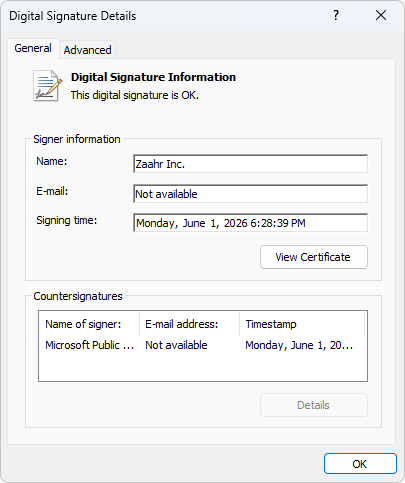
DayReplay.exe → Properties → Digital Signatures → Details. “This digital signature is OK” confirms the Zaahr Inc. signature, countersigned by Microsoft.For SHA-256 verification, the VirusTotal multi-engine consensus URL, and full step-by-step instructions, see verifying the Windows download in the FAQ.
SmartScreen reputation
Installing from the Microsoft Store is not gated by SmartScreen at all — the rest of this section applies only to the direct .msi download. Until Microsoft Defender SmartScreen accumulates download reputation for a newly-issued signing identity, you may still see “Windows protected your PC” on the first installs. The Publisher line in that dialog will read Zaahr Inc. — that is the cert identity. To proceed: click More info, then Run anyway. No system-settings change required. Reputation accrues over time as installs accumulate without being reported as malicious; once enough reputation builds, the warning stops appearing for new releases.
macOS code signing & notarization
The macOS package is fully signed and notarized:
- All Mach-O binaries inside the
.appare signed with a Developer ID Application certificate (--options runtime --timestamp). - The
.dmgdisk image is signed with the same Developer ID Application certificate as the.appinside it (no separate Installer cert — DMG signing usescodesign, notproductsign). - Both the
.appand the.dmgare submitted toxcrun notarytooland stapled, so Gatekeeper does not need a network round-trip to verify on first run.
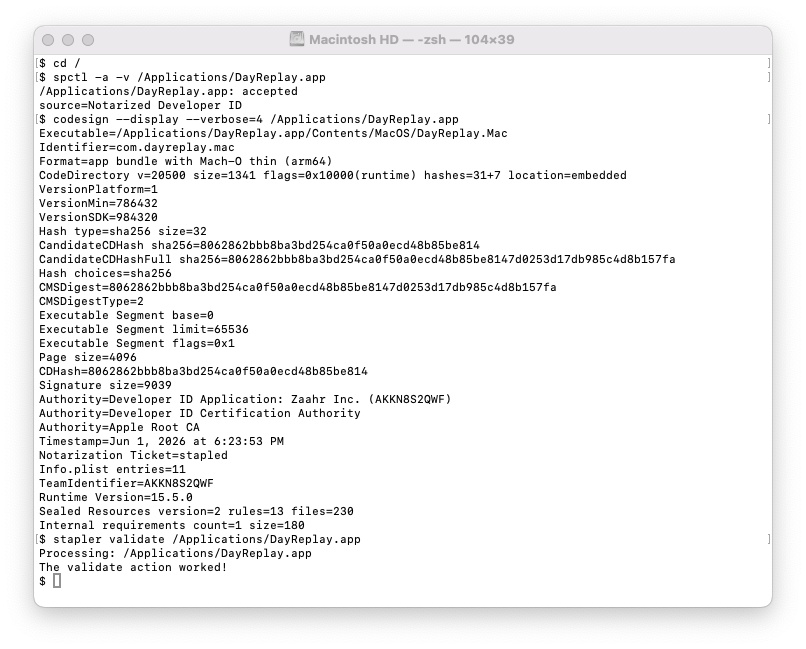
spctl reports accepted · Notarized Developer ID, codesign shows the Zaahr Inc. → Apple Root CA chain with the notarization ticket stapled, and stapler validate confirms the staple.For the Gatekeeper spctl check, VirusTotal scan URL, SHA-256 hash, and step-by-step verification, see verifying the macOS download in the FAQ.
Antivirus guidance
Releases are tested before distribution and reports from security vendors are monitored. If you want a second opinion before installing, every release's installer is publicly scanned by VirusTotal's 70+ engine consensus — links to both platforms' scan results live in the FAQ (Windows · macOS). If your antivirus flags DayReplay despite a clean VirusTotal result, please contact support@dayreplay.app with the exact vendor name and the full alert text — false positives on small newly-signed binaries do happen, and a vendor report from us usually clears them.
Update channel security
The auto-update flow is structured so a compromised network cannot deliver a malicious build:
- The app GETs a JSON manifest from
https://dayreplay.app/api/updates. - The manifest's
zipUrl(or, for older clients,downloadUrl) is checked against an HTTPS allowlist —*.dayreplay.apponly. Suffix-trick variants likedayreplay.app.attacker.comare rejected before any download starts. - The update artifact is downloaded over HTTPS to a per-user staging directory and verified against the manifest's SHA-256 hash.
- On macOS, the staged .zip is extracted with
dittoand the extracted.appis verified end-to-end withcodesign --verify --deep --strictandspctl --assess --type execute— catches any tampering between download and extraction, and confirms Apple's notarization ticket is valid offline. - When the user clicks Restart to Install, a helper script re-runs the codesign verification one more time immediately before the atomic swap — closing the download-to-swap TOCTOU window — and only then moves the extracted bundle into the install location and relaunches the app.
- Updates never auto-install. Staged updates persist on disk until the user explicitly opts in via Restart to Install or Quit and install now; OS shutdown / log out / tray-Quit do not trigger an install. This eliminates a class of race condition where an installer would run mid-shutdown and get killed by the OS session teardown, leaving the install half-applied.